Onn. Wireless Portable Bluetooth Boombox with Digital FM Radio: A Comprehensive Guide
This guide details the Onn. boombox (AAGRY100043854), covering Bluetooth pairing – search for “onn cd bmbx gy” – FM radio, and AUX input functionality for optimal use.
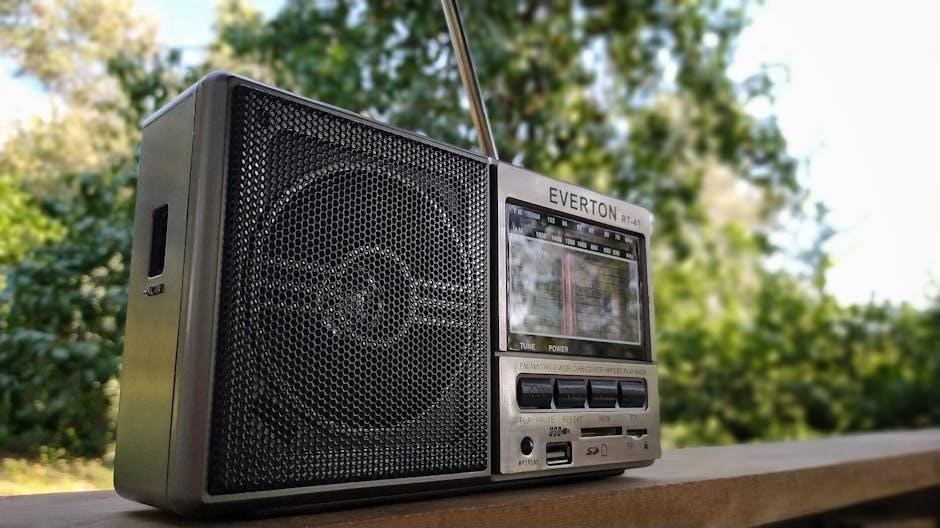
The Onn. Wireless Portable Bluetooth Boombox with Digital FM Radio (model AAGRY100043854) is designed for versatile audio enjoyment; This comprehensive guide will walk you through its features, ensuring a seamless user experience. It’s more than just a radio; it’s a portable entertainment hub.
Offering Bluetooth connectivity, allowing pairing with devices by searching for “onn cd bmbx gy”, alongside traditional FM radio and AUX input, this boombox caters to diverse listening preferences. Its robust design, including an IPX7 waterproof rating, makes it ideal for both indoor and outdoor use. Enjoy extended playtime with its built-in rechargeable battery, providing up to 16 hours of music.
This manual provides detailed instructions for setup, operation, and troubleshooting, maximizing your boombox’s potential.
Key Features and Specifications
The Onn. boombox (AAGRY100043854) boasts several key features. Wireless Bluetooth connectivity enables easy pairing with smartphones and tablets – simply search for “onn cd bmbx gy”. It includes a Digital FM Radio, allowing you to tune into your favorite stations. An auxiliary input (AUX mode) provides connectivity for external devices.
Furthermore, it offers hands-free calling functionality for convenient communication. Its IPX7 waterproof design ensures durability and protection against water exposure. Party Sync Mode allows pairing with another Onn. speaker for an enhanced audio experience. A long-lasting rechargeable battery delivers up to 16 hours of playtime.
This boombox is designed for portability and robust performance.
Setting Up Your Boombox
Initial setup of your Onn. boombox (AAGRY100043854) begins with unboxing and a thorough inspection to ensure all components are present and undamaged. Once unpacked, power on the device using the power button. Familiarize yourself with basic operations, including volume control and mode selection.
The user guide, accessible digitally, provides detailed instructions for setting the clock and navigating various modes like FM radio, presets, and CD playback (if applicable). Ensure your mobile device’s Bluetooth is enabled to initiate pairing. Remember to search for “onn cd bmbx gy” during the connection process.
Proper setup guarantees optimal functionality.
Unboxing and Initial Inspection
Carefully unpack your new Onn. Portable Bluetooth Boombox (AAGRY100043854). Verify the box contains the boombox unit itself, and any included accessories like a power adapter or user manual. Inspect the boombox for any visible signs of damage sustained during shipping – dents, scratches, or broken parts.
Confirm all buttons and ports appear intact and functional. Retain the original packaging for potential future returns or transport. A quick visual check now can prevent issues later. Refer to the digital user guide if anything seems amiss. Ensure you have all components before proceeding with setup.
Powering On and Basic Operations
To power on your Onn. boombox (AAGRY100043854), locate the power button – typically on the top or side panel. Press and hold it until the unit illuminates and emits a power-on chime. The display will activate, showing the current mode. Use the MODE button to cycle through available options: Bluetooth, FM Radio, and AUX.
Volume is adjusted using the dedicated volume control buttons or dial. Familiarize yourself with the button layout for easy operation. The user manual details specific functions. Initial setup may involve setting the clock; consult the guide for instructions. Enjoy exploring the boombox’s features!
Bluetooth Connectivity
Establishing a Bluetooth connection with your Onn. boombox (AAGRY100043854) is straightforward. First, ensure Bluetooth is enabled on your mobile device. Then, activate Bluetooth mode on the boombox by pressing the MODE button. Your device should then detect “onn cd bmbx gy” in the list of available devices.
Select “onn cd bmbx gy” to initiate pairing. The boombox’s Bluetooth icon will stop flashing upon successful connection. You can now stream audio wirelessly. If pairing fails, consult the troubleshooting section for assistance. Enjoy seamless audio playback from your favorite devices!
Pairing with Mobile Devices (onn cd bmbx gy)
To pair your smartphone or tablet, activate Bluetooth on your device. On the Onn. boombox (AAGRY100043854), enter Bluetooth mode via the MODE button. Your mobile device will scan for available connections. Locate and select “onn cd bmbx gy” from the list of discovered devices.
The boombox will attempt to establish a connection. Once paired successfully, the flashing Bluetooth indicator on the boombox will become solid. You are now ready to stream music or podcasts wirelessly. Ensure no other devices are interfering with the Bluetooth signal for a stable connection.
Troubleshooting Bluetooth Connection Issues
If pairing fails, ensure Bluetooth is enabled on your device and the boombox is in pairing mode. Verify “onn cd bmbx gy” appears in your device’s Bluetooth list. If it doesn’t, try restarting both devices. Clear previously paired devices from your phone’s Bluetooth settings to avoid conflicts.
Move closer to the boombox, as distance can affect connectivity. Interference from other wireless devices may also cause issues; move away from potential sources. If problems persist, reset the boombox to factory settings (consult the full user manual – AAGRY100043854) and retry the pairing process.
FM Radio Functionality
To enjoy FM radio, press the MODE button until you reach FM radio mode. Use the tuning controls to scan for available stations. The user manual (AAGRY100043854) details setting the clock for accurate operation. Utilize the preset function to save your favorite stations for quick access.
Explore the digital FM radio settings within the boombox’s menu to optimize audio quality and station scanning. Refer to the guide for specific instructions on accessing and adjusting these settings. Enjoy clear reception and convenient access to your preferred radio broadcasts with this versatile feature.
Tuning into FM Stations
Initiate FM radio mode by pressing the MODE button until “FM” appears on the display. Begin scanning for stations using the tuning controls – typically buttons labeled with up/down arrows or a rotating dial. The boombox will automatically search for available frequencies.
Once a station is found, fine-tune the reception for optimal clarity. If the signal is weak, adjust the antenna or reposition the boombox. The user manual (AAGRY100043854) provides detailed illustrations of the controls and antenna placement for best results. Enjoy your favorite FM broadcasts!
Using FM Radio Presets
To save your favorite FM stations, tune into the desired frequency first. Then, press and hold the preset button (numbered 1-5, typically) until a confirmation tone sounds. This stores the station at that number.
Recalling a preset is simple: briefly press the corresponding preset button. The boombox will instantly tune to the saved station. The user manual (AAGRY100043854) details the preset functionality. Overwrite existing presets by repeating the saving process. Enjoy quick access to your preferred radio stations with this convenient feature!
Digital FM Radio Settings
The Onn. boombox’s digital FM radio offers enhanced tuning and clarity. While specific settings may vary, the user manual (AAGRY100043854) outlines how to adjust scan sensitivity for optimal reception. This impacts the boombox’s ability to locate and lock onto weaker signals.
Explore options for auto-scan, which automatically searches for available stations, or manual tuning for precise frequency selection. Some models may include a display showing signal strength. Refer to the guide for detailed instructions on navigating these settings and maximizing your FM radio experience.
CD Player Operation (If Applicable)
If your Onn. boombox model includes a CD player, operation is straightforward. The user manual (AAGRY100043854) details loading CDs with the tray mechanism. Once loaded, use the play/pause, skip forward, and skip backward buttons for control.
CD playback modes may include repeat (one track or all tracks) and shuffle. Explore these options via the boombox’s controls or the digital display. Ensure CDs are clean and free of scratches for optimal performance. Refer to the manual for troubleshooting tips if encountering playback issues.
Loading and Playing CDs
To load a CD, gently press the ‘Open’ button on the boombox, activating the CD tray. Place your CD label-side up into the tray, ensuring it sits flat. Then, press the ‘Close’ button to retract the tray.
Once closed, the CD player will automatically detect the disc. Press the ‘Play/Pause’ button to begin playback. Utilize the ‘Skip Forward’ and ‘Skip Backward’ buttons to navigate tracks. The user manual (AAGRY100043854) provides detailed illustrations of these steps. Always handle CDs with care to avoid scratches and ensure optimal audio quality.
CD Playback Modes
The Onn. boombox offers several CD playback modes to enhance your listening experience. Pressing the ‘Mode’ button while a CD is playing cycles through these options. Available modes include ‘Repeat One’, which loops a single track, and ‘Repeat All’, which repeats the entire CD continuously.
Additionally, a ‘Shuffle’ mode randomly plays tracks from the CD. Refer to the user guide (AAGRY100043854) for visual cues on the display indicating the active playback mode. These features provide versatile control over your CD listening sessions, allowing for customized enjoyment of your music collection.
Auxiliary Input (AUX Mode)
The Onn. boombox features an auxiliary input (AUX mode), enabling connection to external audio devices like smartphones or MP3 players. To utilize this function, simply press the ‘MODE’ button repeatedly until ‘AUX’ is displayed on the unit’s screen.
Next, connect a standard 3.5mm audio cable (not included) from the external device’s headphone jack to the boombox’s AUX input port. Once connected, control playback and volume directly from the external device. This provides a convenient alternative to Bluetooth connectivity, ensuring compatibility with a wider range of audio sources.
Connecting External Devices via AUX
To connect an external device via AUX, you’ll require a standard 3.5mm audio cable. Locate the AUX input port on the Onn. boombox – it’s typically a circular jack. Connect one end of the audio cable securely into the headphone output of your external device, such as a smartphone, tablet, or MP3 player.
Then, firmly insert the other end of the cable into the boombox’s AUX input. Ensure both connections are snug to prevent audio interruptions. Select ‘AUX’ mode on the boombox using the ‘MODE’ button. Now, control playback and volume directly from your connected device for a seamless audio experience.
Hands-Free Calling
The Onn. boombox offers convenient hands-free calling when paired with a Bluetooth-enabled smartphone. Once connected, incoming calls will automatically transfer to the boombox, pausing any audio playback. Answer calls directly by pressing the designated call button on the boombox – typically the multi-function button.
To make calls, initiate the call from your smartphone as usual. The boombox will act as a speakerphone, allowing you to converse without holding your phone. Adjust the volume using the boombox’s volume controls. End calls by pressing the call button again, resuming audio playback afterward.
Answering and Making Calls
When a call arrives while connected via Bluetooth, the boombox will pause any current audio and alert you with a ringtone. To answer the call, simply press the multi-function button located on the unit. Pressing the same button again will end the current call. If you prefer to reject an incoming call, a longer press of the multi-function button will decline it.
To initiate a call, use your paired smartphone’s dialer as normal. The audio will then route through the boombox’s speakers. Volume control is managed through the boombox’s dedicated volume buttons, ensuring clear communication during your hands-free calls.
Waterproof Design & Durability (IPX7)
The Onn. boombox boasts an IPX7 waterproof rating, offering substantial protection against water exposure. This means the device can withstand immersion in up to one meter of water for a duration of up to 30 minutes. It’s ideal for poolside listening or outdoor adventures, but remember to dry the unit thoroughly after exposure.
The IPX7 rating doesn’t guarantee protection against all conditions; avoid prolonged submersion or exposure to high-pressure water jets. This robust design ensures durability and peace of mind, allowing you to enjoy your music without worrying about accidental splashes or brief immersions.
Understanding the IPX7 Waterproof Rating
The IPX7 rating signifies a high level of water resistance, but it’s crucial to understand its limitations. “IP” stands for Ingress Protection, and the numbers indicate protection levels. Specifically, IPX7 means the device is protected against immersion in water with a depth of up to 1 meter (approximately 3.3 feet) for up to 30 minutes.
However, this rating doesn’t cover dust or other particulate matter. It also doesn’t guarantee protection against water pressure, like from a hose. The boombox will float, but prolonged or forceful water exposure is still discouraged. Always ensure all ports are dry before charging or connecting devices.
Party Sync Mode
Party Sync Mode allows you to wirelessly connect two Onn. boomboxes for a more powerful and immersive audio experience. This feature effectively doubles the sound output, perfect for larger gatherings or outdoor events. To activate, ensure both boomboxes are powered on and within Bluetooth range of each other.
Consult the user manual for specific instructions on initiating the pairing process, as it may involve a dedicated “Party Sync” button or a combination of button presses. Once paired, the speakers will synchronize audio playback, creating a stereo or amplified mono soundscape. Enjoy a more dynamic listening experience!
Pairing Multiple Onn. Speakers
To enhance your audio experience, the Onn. boombox supports pairing with another identical unit via Party Sync Mode. Begin by powering on both boomboxes and ensuring they are within Bluetooth range – ideally, within 10 feet of each other. Initiate the pairing process on the primary boombox, typically by pressing and holding the designated “Party Sync” button.
The boomboxes will automatically search for each other and establish a connection. A successful pairing is usually indicated by an audible tone or a visual confirmation on the display. Once connected, both speakers will play the same audio simultaneously, creating a wider and more immersive soundstage.
Battery Life and Charging
The Onn. boombox features a built-in rechargeable battery designed to provide up to 16 hours of playtime on a single full charge. Actual battery life may vary depending on volume levels, audio source, and usage of features like Bluetooth and FM radio. To maximize battery performance, avoid extreme temperatures and fully charge the unit before extended use.
Charging is typically accomplished using a standard USB charging cable (not always included). Connect the cable to the boombox’s charging port and a suitable USB power source. A charging indicator light will illuminate, typically red while charging and turning off or changing color (often to green) when fully charged.
Maximizing Battery Performance (Up to 16 Hours)
To achieve the advertised up to 16 hours of playtime, several factors should be considered. Lowering the volume significantly extends battery life, as higher volumes demand more power. Avoid using extreme volume levels for prolonged periods. Disconnecting Bluetooth when not streaming audio conserves energy. Similarly, minimize FM radio usage if battery life is a priority.
Storing the boombox in cool, dry conditions when not in use helps maintain battery health. Avoid exposing the device to extreme temperatures, which can degrade battery capacity over time. Regularly charging and discharging the battery, rather than leaving it depleted for extended periods, also contributes to longevity.
Charging Instructions
To charge your Onn. boombox, use the provided USB charging cable. Connect the cable to a compatible USB power adapter (5V/1A recommended) and plug it into a wall outlet. The charging port is located on the unit’s rear panel. A red indicator light will illuminate during the charging process, signifying that power is being supplied to the battery.
Allow approximately 3-6 hours for a full charge, depending on the battery’s current state. The red indicator light will typically turn off or change color (consult the full user manual for specific color indications) once charging is complete. Avoid using the boombox while it is charging to ensure optimal charging efficiency and battery health.
User Manual and Support Resources
For comprehensive guidance beyond this quick start, access the complete digital user manual for your Onn. Portable Bluetooth CD Boombox (model AAGRY100043854). This detailed resource covers all features, including clock settings, FM radio operation with presets, and CD playback modes. Find the manual online through Walmart’s website or by searching itsManual.com for “onn Bluetooth CD Boombox AAGRY100043854 User Guide”.
Should you encounter issues or require further assistance, Walmart’s customer support channels are available. Refer to the packaging or Walmart’s website for contact information, including phone numbers and online support options. Utilize these resources to maximize your enjoyment of the boombox.
Accessing the Digital User Guide (AAGRY100043854)
Locating the full user guide for your Onn. Portable Bluetooth CD Boombox (model AAGRY100043854) is straightforward. Visit itsManual.com and search directly for the model number to instantly access a digital version mirroring the printed manual. Alternatively, explore Walmart’s official website, navigating to the product page for the boombox; a link to the downloadable PDF is often provided there.
This digital guide comprehensively explains every function, from Bluetooth pairing – remembering to search for “onn cd bmbx gy” – to utilizing FM radio presets and mastering AUX mode. It’s an invaluable resource for unlocking the full potential of your Onn. boombox.